ClickUp's Free Forever plan is generous on the headline number and specific about everything else. Unlimited tasks, unlimited members, unlimited guests, then a set of caps that most teams meet in a predictable order.
Here is what stops you, roughly when, and what the next tier costs. Each figure below was checked against ClickUp's pricing page and help center on 13 August 2026.
Free tier
Yes, with no trial clock and no card. Free Forever carries unlimited tasks, unlimited members, and unlimited guests, which is the part every comparison article quotes. What is rationed is storage, custom field values, exports, and the shape of the Hierarchy.
The published limits
| Limit | Free Forever |
|---|---|
| Tasks | Unlimited |
| Members | Unlimited |
| Guests | Unlimited, full permissions only |
| Attachment storage | 60MB |
| Custom Field uses | 60 |
| Spaces | 5 |
| Lists per Space | 40 |
| Folders per Space | 100 |
| List, Table, or Form view exports | 5 |
| Automations | 5 active rules and 100 executions |
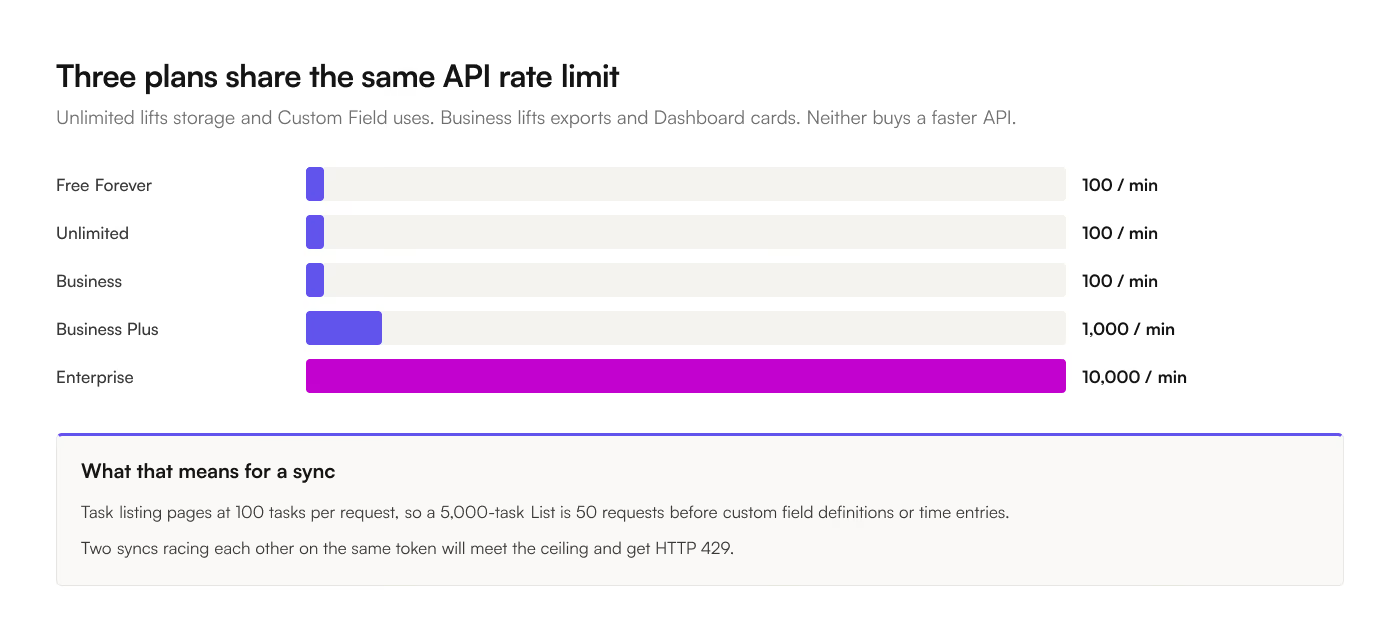
| API requests | 100 per minute per token |
| Dashboards | Trial access, free cards only |
Two of those numbers are worth sourcing, because ClickUp publishes them twice and the 2 copies disagree. The import and export limits page still lists "100 mb of storage for attachments" and "100 Lists and Folders per Space" at the bottom of an article about imports. The pricing page and the dedicated Workspace storage limits article both say 60MB, and the pricing table splits Lists (40) from Folders (100). Plan against the lower numbers.
The order teams hit them
1. Attachment storage, at 60MB
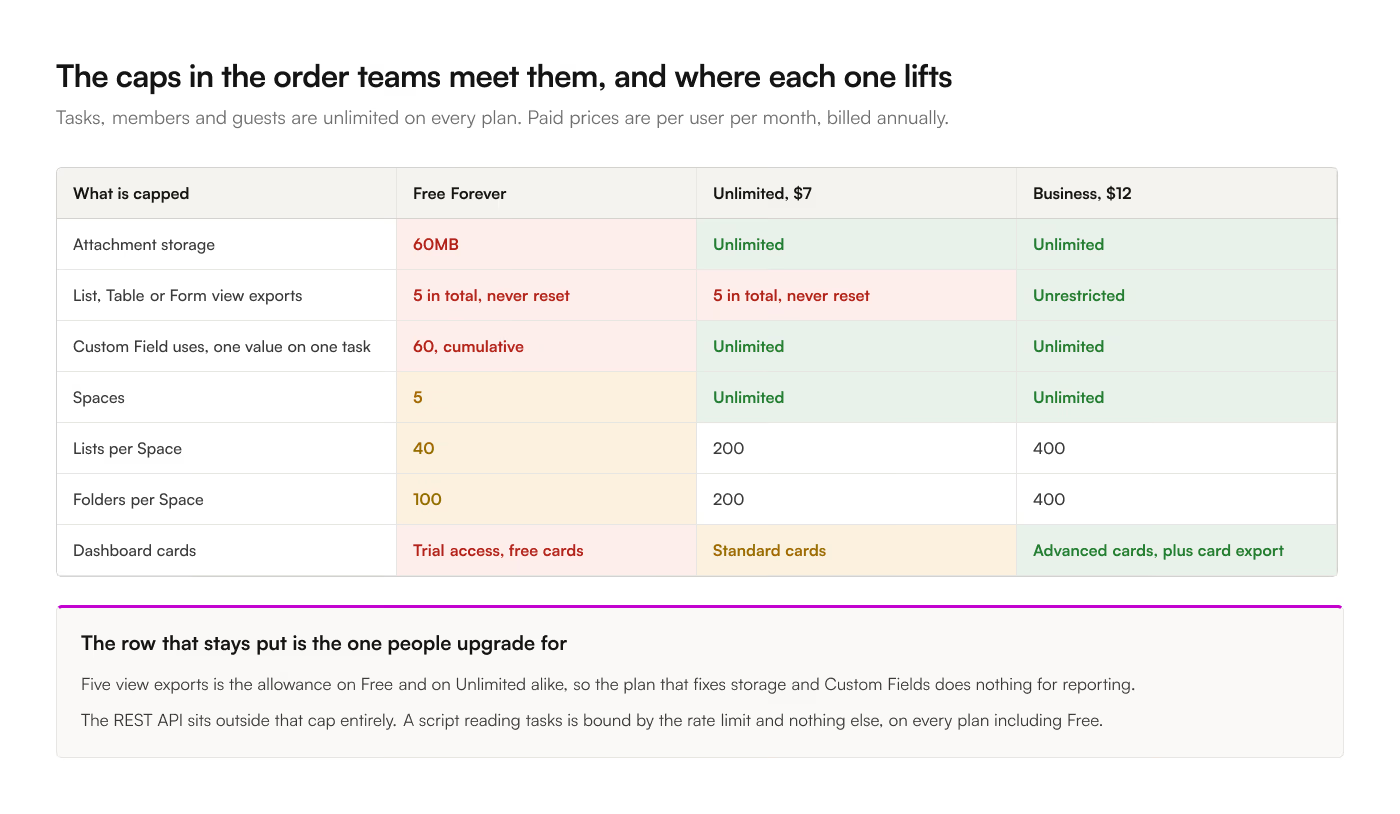
This is the first wall and it arrives fast. 60MB is one design mockup, a handful of screenshot-heavy tasks, or a single short screen recording. Storage counts more than task attachments: Chat uploads, Doc images, cover images, and Clip recordings all draw on the same 60MB.
Because attachments are how people communicate inside a task, the cap gets hit by ordinary use rather than by anything anyone would call heavy.
The workaround is real and most teams find it: keep files in Google Drive and paste links. ClickUp's Drive integration makes that reasonable. It also means your attachments are invisible to any spreadsheet export, because what crosses is a URL rather than a file, and a ClickUp-hosted attachment URL needs a valid session to open anyway.
2. Exports, capped at 5
Free Forever and Unlimited plans can export 5 List, Table, or Form views. Total, not per month.
This is the limit that reframes the whole plan for anyone who reports out of ClickUp. 5 is enough to try the feature and not enough to build a habit on. ClickUp's own documentation is inconsistent here too: the export overview describes view export as Business-and-above, while the feature limits page documents the 5-export allowance on the lower plans. Either way, recurring export is a paid motion. Every option in the export dialog covers what you get for those 5.
The API is outside this cap. A script reading tasks over the REST API is bound by the 100-requests-per-minute rate limit and nothing else, on every plan including Free. If your goal is getting data out on a schedule, that route stays open when the export button does not. The ClickUp API guide covers it, and ClickUp to Sheets uses the same API path, so it works on a Free workspace too.
3. Custom Field uses, at 60
The number most articles quote as "60 Custom Fields" is 60 Custom Field uses, which is a much tighter limit than it sounds.
A use is counted each time you set a value on a task. Creating fields costs nothing, adding dropdown options costs nothing, and 2 labels on one Label field cost 2. So 60 uses is 15 tasks with 4 fields filled in, or 12 tasks with 5 fields. Hit it and you cannot add a value to any Custom Field anywhere in the workspace, Relationships and Task fields included, until you upgrade.
Existing data stays readable. What stops is writing new values, which arrives as a broken data-entry habit rather than as a missing feature, and it lands on whoever is doing the tidying that week.
4. Structure, at 5 Spaces and 40 Lists
Free Forever gives you 5 Spaces. Each Space holds 40 Lists and 100 Folders. Unlimited raises Lists and Folders to 200 each and drops the Space cap entirely.
Agencies running a Folder or a List per client are the ones who meet this, and the Space cap usually arrives first: an internal Space, a client Space, a sales Space. That is half the plan gone.
5. Dashboards, at trial access
Free gets trial access to Dashboards and the free cards only. The card tiers run in 3 steps: free cards on every plan, standard cards from Unlimited, advanced cards from Business. Exporting a card's data as CSV, PDF, PNG, JPEG, or SVG is Business and above.
If reporting is why you are looking at plans, this line and the export cap point at the same conclusion: ClickUp's reporting is a paid feature. Building the report in Google Sheets against synced data sidesteps both, which is why plenty of Free and Unlimited workspaces report out of a spreadsheet. ClickUp Dashboards compared with Google Sheets reporting works through what you give up.