ClickUp API to Google Sheets: A Working Apps Script Guide

Get an API key, page the task endpoint, resolve custom field ids, and stay under 100 requests a minute. Working Apps Script code for every step.

Title card showing a ClickUp API request returning tasks into a Google Sheets tab on a dark background

The ClickUp API is a REST API at https://api.clickup.com/api/v2, authenticated with a token, returning JSON. ClickUp's own reference documents every endpoint. What it does not document is the shape of a working integration: which parameters are required for the result to match what a person sees in the app, and which ceilings you hit in what order.

This is that, worked through end to end with Google Apps Script as the host, because Apps Script runs inside the spreadsheet, can be scheduled, and costs nothing. The API parts transfer to any language; only the last 2 sections are Apps Script specific.

ClickUp API cost

Yes, on every plan. ClickUp sells no separate API tier and gates no endpoint behind a subscription. What the plan buys is throughput: the rate limit page gives Free Forever, Unlimited, and Business the same 100 requests per minute per token, Business Plus 1,000, and Enterprise 10,000. A Free workspace can run everything below; it just runs it slowly against a large List.

2 ClickUp limits get mistaken for API limits. Custom Fields are capped at 60 uses on Free Forever, so a field you expect in the response may not exist on the task. And view exports are capped at five on the lower plans, which is usually the reason someone is reading an API guide at all. The free plan limits has the rest of the table.

Getting a ClickUp API key

For a script only you run, a personal API token is the shortest path. In ClickUp, open your avatar, then Settings, Apps, and generate a token. It begins pk_ and carries every permission your own account has, which is what makes where you put it matter.

Store it in Script Properties rather than in the code, so it does not travel with a copy of the spreadsheet:

// Run once, from the editor, then delete the literal.
function saveToken() {
  PropertiesService.getScriptProperties().setProperty("CLICKUP_TOKEN", "pk_...");
}

function token() {
  return PropertiesService.getScriptProperties().getProperty("CLICKUP_TOKEN");
}

The token is sent as a bare Authorization header with no Bearer prefix, which trips up anyone used to OAuth:

function clickupFetch(path) {
  const response = UrlFetchApp.fetch("https://api.clickup.com/api/v2" + path, {
    headers: { Authorization: token() },
    muteHttpExceptions: true,
  });
  if (response.getResponseCode() === 429) throw new Error("rate limited");
  return JSON.parse(response.getContentText());
}

If other people will run this, a personal token is the wrong answer, because it acts as you and carries your permissions. That case needs an OAuth app, and OAuth in Apps Script is enough work that it is worth asking whether an off-the-shelf add-on is cheaper than your time.

Finding the List id

Everything hangs off a List id, and the hierarchy is Workspace, Space, Folder, List, with Lists allowed to sit directly in a Space.

The quickest route is the URL. Open the List in ClickUp and the address ends in the id: app.clickup.com/9012345678/v/l/6-901234567890-1. The middle number of that final segment is the List id.

The programmatic route walks down:

const teams = clickupFetch("/team").teams;
const spaces = clickupFetch("/team/" + teams[0].id + "/space?archived=false").spaces;
const folders = clickupFetch("/space/" + spaces[0].id + "/folder?archived=false").folders;
const lists = clickupFetch("/folder/" + folders[0].id + "/list?archived=false").lists;
// Folderless Lists need a separate call:
const loose = clickupFetch("/space/" + spaces[0].id + "/list?archived=false").lists;

That last line is easy to forget and produces a script that silently cannot see a third of the workspace.
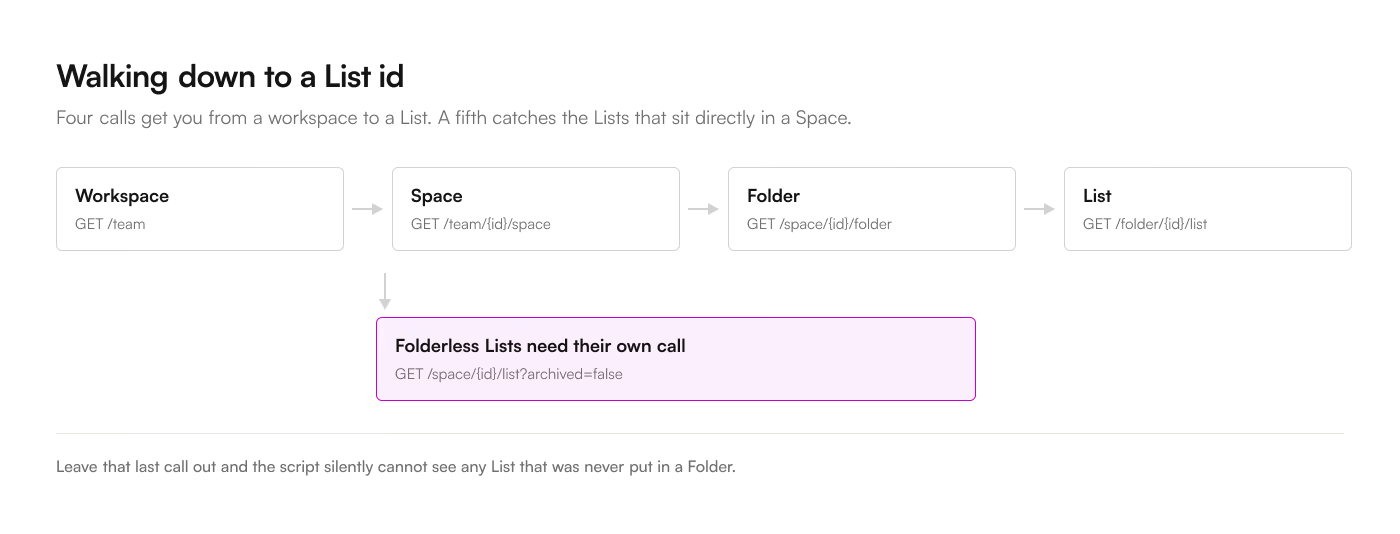
The call chain from workspace to List: GET /team, then /team/{id}/space, then /space/{id}/folder, then /folder/{id}/list, with a branch off the Space step for folderless Lists at GET /space/{id}/list

The pagination loop

GET /list/{list_id}/task returns 100 tasks per page, and the response carries no total count. You page until a page comes back short:

function fetchAllTasks(listId) {
  const tasks = [];
  let page = 0;
  while (true) {
    const query = "?page=" + page + "&subtasks=true&include_closed=true";
    const batch = clickupFetch("/list/" + listId + "/task" + query).tasks;
    tasks.push(...batch);
    if (batch.length < 100) break;
    page += 1;
  }
  return tasks;
}

2 query parameters decide whether the result matches what a person sees in ClickUp.

subtasks=true is required or you get parents only. This is the single most common cause of a script that returns a third of the expected rows, and what each route does with subtasks covers the rest of the trap, including the deletes that never reach you.

include_closed=true is required or Done tasks are missing. Leave it off and your completion-rate report is 100% forever, which looks like good news until someone checks.

Whatever combination you choose, use the same one everywhere in the script. A refresh that reads a narrower set than the initial load will delete rows it simply could not see.
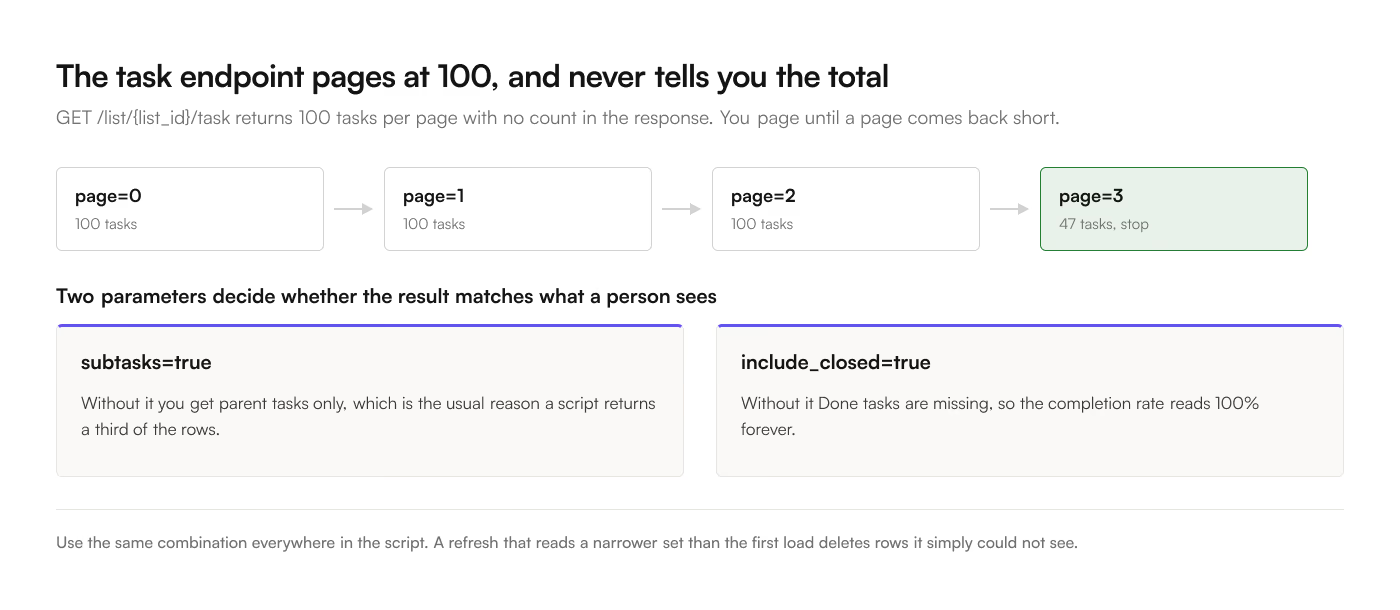
4 pages of the ClickUp task endpoint returning 100, 100, 100 and then 47 tasks, where the short page ends the loop, with panels on the subtasks and include_closed parameters that decide whether the result matches what a person sees

Resolving custom fields

A task's custom_fields array gives you each field's id, name, type, type_config, and value. For text and number fields the value is what you want. For a dropdown it is an option id, and the human label lives in type_config.options.

function fieldValue(field) {
  if (field.type === "drop_down") {
    const option = (field.type_config.options || []).find(
      (candidate) => candidate.id === field.value,
    );
    if (!option) return "";
    return option.name;
  }
  if (field.type === "labels") {
    const chosen = field.value || [];
    return (field.type_config.options || [])
      .filter((option) => chosen.includes(option.id))
      .map((option) => option.label)
      .join(", ");
  }
  if (field.type === "date" && field.value) {
    return new Date(Number(field.value));
  }
  return field.value;
}

Note option.name for a dropdown and option.label for labels. The 2 types disagree on the property name and there is no reason for it, so this is worth a comment in your own code.

What each ClickUp custom field type becomes in a cell covers the rest of the types, including the 2 that cannot be fully recovered.

Ceiling 1: 100 requests per minute

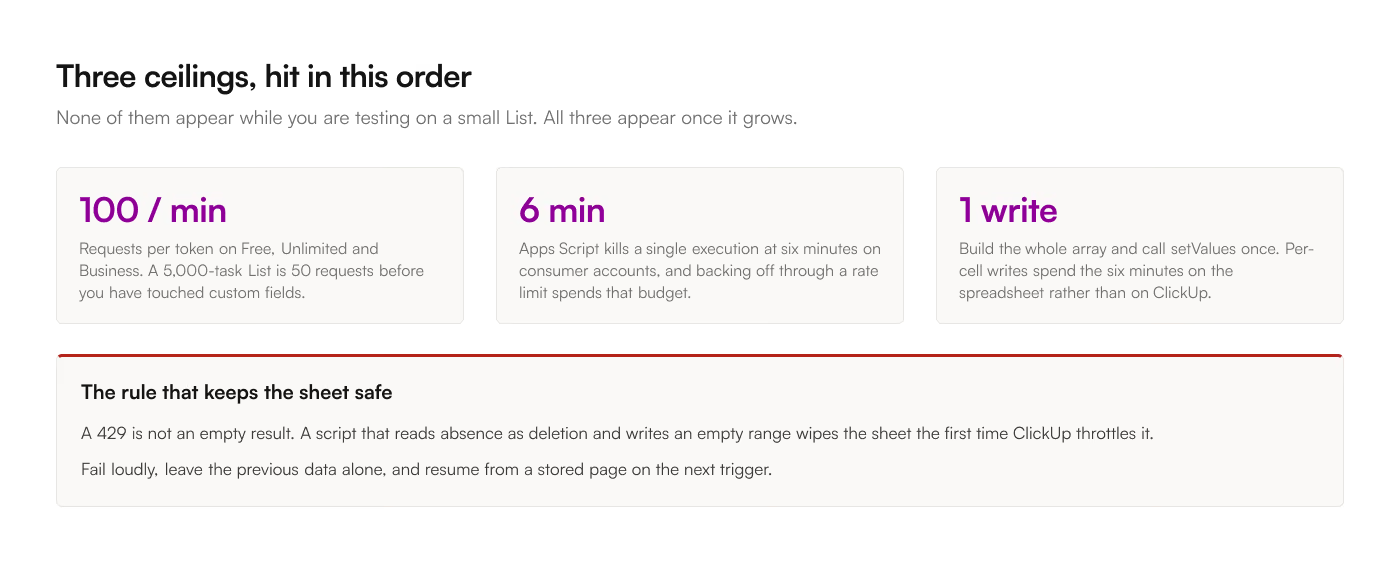
That 100 requests a minute is counted per token rather than per script, so every trigger, every ad-hoc run from the editor, and every other integration holding the same token draw on one budget. Over it you get HTTP 429.

A 5,000-task List is 50 requests before you have touched anything else. Add per-List field definitions and a time-entries pull and one refresh can approach the ceiling on its own. 2 triggers overlapping will pass it.

3 ceilings a ClickUp sync in Apps Script meets: 100 requests per minute per token on Free, Unlimited and Business; 6 minutes per execution; a single setValues write. A 429 must never be read as an empty result, because a script that writes an empty range wipes the sheet

Back off rather than retrying immediately:

function withRetry(work, attempts) {
  attempts = attempts || 5;
  for (let attempt = 0; attempt < attempts; attempt += 1) {
    try {
      return work();
    } catch (error) {
      if (attempt === attempts - 1) throw error;
      Utilities.sleep(Math.pow(2, attempt) * 1000);
    }
  }
}

The important part is that a 429 must never be treated as "no data." A script that reads absence as deletion and writes an empty range will wipe the sheet the first time ClickUp throttles it. Fail loudly and leave the previous data alone.

Ceiling 2: 6 minutes per execution

Apps Script kills a single execution at 6 minutes on consumer Google accounts. Sleeping through a rate-limit backoff spends that budget fast.

The pattern that survives is a checkpoint. Store the page you reached and the rows you accumulated, exit cleanly, and let the next trigger resume:

const started = Date.now();
// inside the paging loop
if (Date.now() - started > 4.5 * 60 * 1000) {
  PropertiesService.getScriptProperties().setProperty("resumePage", String(page));
  return; // next trigger picks it up
}

Getting this right, with partial state that stays consistent if the script dies mid-write, is most of the work in a production version. It is also the part that is invisible until the List grows past whatever size it was when you tested.

The trigger itself lives under Triggers in the Apps Script editor, and time-driven is the only kind available to you here: a Google Sheet has no endpoint that stays warm, so ClickUp's webhooks cannot reach it. How each refresh model behaves covers what that rules out.

Ceiling 3: writing to the sheet

Call setValue per cell and a 2,000-row sync takes minutes and burns the 6-minute budget on spreadsheet calls rather than on ClickUp. Build the whole array and write it once:

const rows = tasks.map(toRow);
const sheet = SpreadsheetApp.getActive().getSheetByName("Tasks");
sheet.getRange(2, 1, sheet.getMaxRows() - 1, headers.length).clearContent();
sheet.getRange(2, 1, rows.length, headers.length).setValues(rows);

Clearing then writing the full range is also what gives you deletes for free: a task that vanished from ClickUp is simply absent from rows. That is the whole reason to prefer a full replace over an append, and it is why the include_closed and subtasks parameters have to be stable between runs.

Build or buy

The script above is perhaps 150 lines and an afternoon. The version that survives contact with a real workspace adds checkpointing, backoff, field-definition caching, timezone handling for dates, and a way to tell whether the last run succeeded. That is closer to a week, plus whatever it costs when it breaks while you are on holiday and someone builds a forecast on a stale tab.

Write it when you need something no tool offers: a join across Lists on your own key, a computed column with business logic, a destination that is not a spreadsheet. Buy it when what you need is "this List, in this tab, current." The 4 routes, compared puts the script beside the alternatives. ClickUp to Sheets is $9 a month for that, which is less than an afternoon of anybody's time.