Zapier is the tool most teams already have, which makes it the tool they reach for when a ClickUp List needs to appear in Google Sheets. Sometimes that is correct. Often it is expensive in a way that shows up 3 weeks later, on the day someone bulk-updates 400 tasks.
Both tools do what they say. They are built around different units of work, and the unit decides the price.
Zapier task counting
A task is one successful action step. Zapier's own accounting is more generous than most people assume, and it is worth knowing exactly where the line sits before you model a cost.
Free, per Zapier's task usage documentation:
- Every trigger step
- Every Filter or Paths step
- Formatter steps
- Any step that never ran, because a filter stopped it or the Zap errored
- A search action set to not proceed when nothing is found
Billed:
- Every successful action step
- A search action set to proceed when nothing is found, at one task
That last pair is the one that decides your bill. A "find the row, then update it" pair costs one task if the row always exists. Set the search to proceed when nothing is found, which is what you need so a brand-new ClickUp task gets appended instead of dropped, and the pair costs two.
Published Zapier prices
Task allowances and prices from zapier.com/pricing, monthly-billed and annual-billed:
| Zapier plan |
Tasks per month |
Per month, annual |
Per month, monthly |
| Free |
100 |
$0 |
$0 |
| Professional |
750 |
$19.99 |
$29.99 |
| Professional |
1,500 |
$39.00 |
$58.50 |
| Professional |
2,000 |
$49.00 |
$73.50 |
| Professional |
5,000 |
$89.00 |
$133.50 |
| Team |
2,000 |
$69.00 |
$103.50 |
| Team |
5,000 |
$119.00 |
$178.50 |
ClickUp to Sheets charges per account. $9 a month, or $90 a year, for Starter with up to 3 Lists or views on manual sync. $19 a month, or $190 a year, for Pro with unlimited Lists, 3-hourly scheduling, time entries and user sync. $39 a month, or $390 a year, for Business, which adds two-way sync, live sync and reports. Rows are not metered on any plan.
Cost arithmetic
Take a 500-task ClickUp List where roughly 40% of tasks change in a given month, so around 200 changes.
Through Zapier, a "task updated" trigger fires on each change. The trigger is free. The update-row action is one task. Add the lookup step you need so new tasks append rather than vanish, and each change is two.
- Update only, row guaranteed to exist: 200 tasks a month
- Lookup plus update, handling new tasks: 400 tasks a month
One List at the 2-step shape already eats more than half the entry Professional tier. A second List puts you over it.
The failure mode is worse than the average. Bulk-update statuses across a sprint and every affected task fires. An afternoon of housekeeping across 400 tasks costs 400 to 800 tasks, which can exceed what the entry Professional plan holds for the whole month.
What happens next is the part worth planning for. Free-plan Zaps pause and hold their runs. On Professional, Team and Enterprise, pay-per-task billing keeps the Zaps running past the allowance and bills the overage at a rate specific to your account, shown in Billing settings. Both routes end at the same wall: Zapier halts your Zaps at 3 times your plan's task limit. On the 750-task Professional plan that ceiling is 2,250 tasks, and the sheet stops updating there until the pay period rolls over.
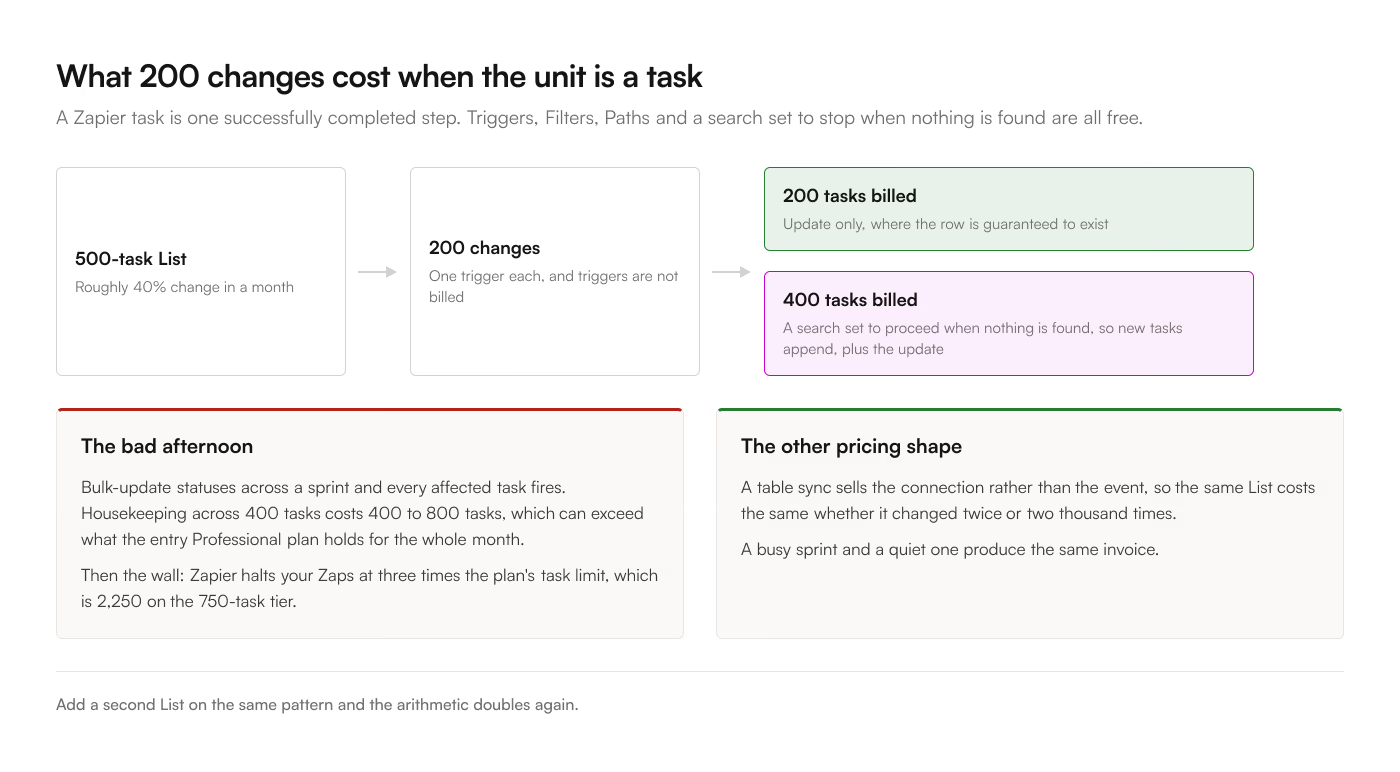
Through a table sync, the same 500-task List costs the same $9 to $19 a month whether it changed twice or 2,000 times, because the unit being sold is the connection rather than the event.
Cases for Zapier
This is a real category and it is worth being straight about it.
Cross-application workflows. "When a ClickUp task moves to Done, post to Slack, create a Xero invoice, and append a row to a tracking sheet." Nothing in a Sheets add-on does the first two. Zapier is the only sensible answer.
Append-only logs. "Each form submission adds one row, forever." That is one task per event with no table to keep in sync, and the volume is naturally low.
Conditional routing. "If the client field is Acme, write to this sheet, otherwise that one." Zapier's Paths handle this and cost nothing against your quota, because Paths steps are free. A table sync writes one List to one tab.
You already pay for it and the volume is small. A 40-task List that changes rarely fits inside the free tier and costs nothing to set up. Do not overthink it.
Cases for a table sync
Mirroring a List. If the requirement is "the tab should show what the List shows," you want a sync, because that is a state comparison and Zapier models state changes.
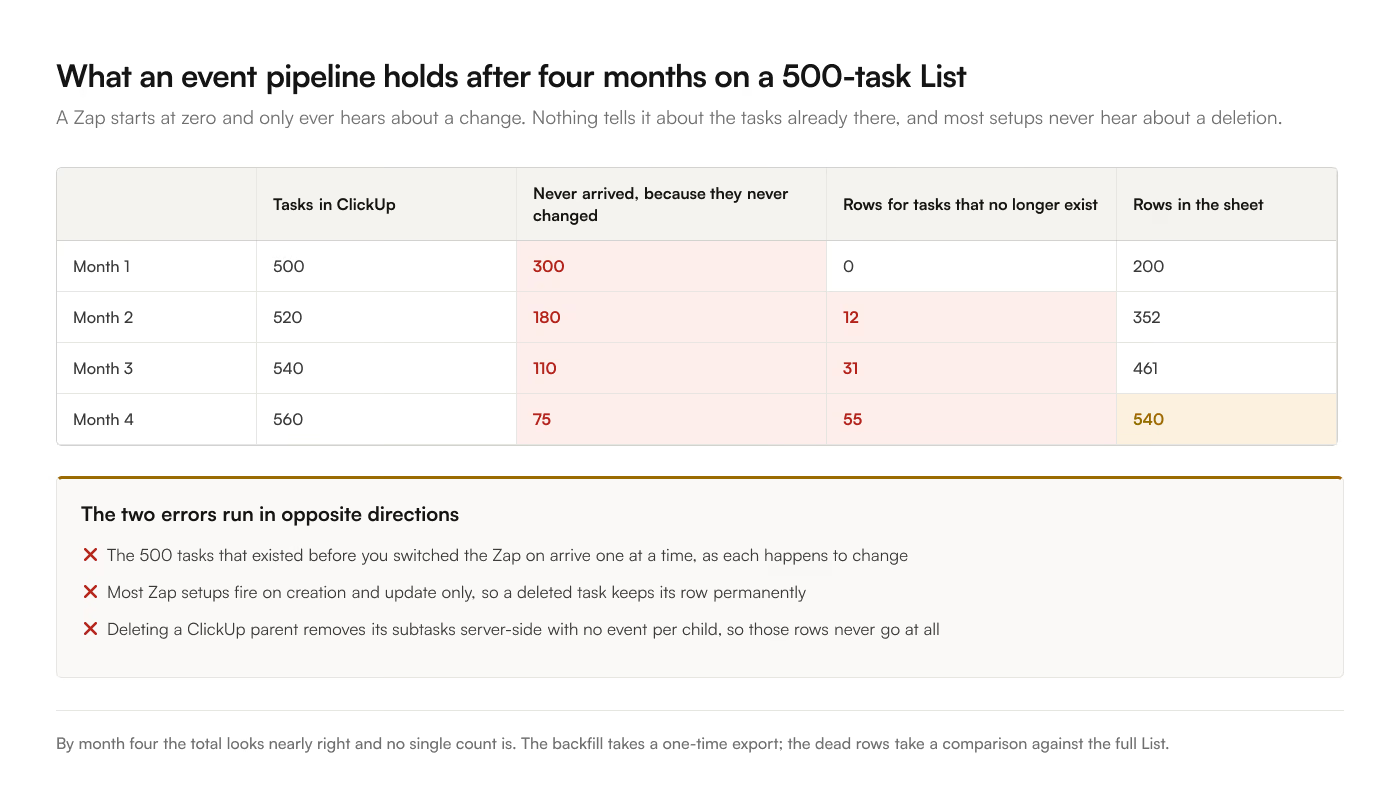
Deletes. A Zap fires on task creation and update. When a task is deleted in ClickUp, most Zap setups leave the row in the sheet permanently, so the sheet only grows and every count is slightly wrong. ClickUp's delete behavior makes this worse: deleting a parent task removes its subtasks server-side without emitting an event for each child, which is a specific problem if you pull subtasks into the sheet. A sync that reconciles against the source catches those. An event pipeline structurally cannot.
Freshness under load. Zapier polls. Free polls every 15 minutes, Professional every 2, Team every 1. A live sync pushes on the webhook and lands in seconds, and it holds that up when 400 things change at once. The scheduling options are laid out here.
Historical backfill. A Zap starts working from the moment you turn it on. Your existing 500 tasks stay out of the sheet until each one happens to change. Getting them there means a separate one-time export, which puts you back in the CSV workflow you were leaving.
Setup, honestly compared
Zapier: connect ClickUp, connect Google Sheets, pick a trigger, add a lookup step so updates find the existing row rather than appending a duplicate, map every field by hand, then test. Reckon on 30 to 60 minutes for a first List. Field mapping is the slow part, and it has to be redone whenever you add a custom field.
The add-on: install from the Google Workspace Marketplace, authorize ClickUp in the sidebar, pick a List and the fields you want, sync. 5 to 10 minutes. Columns come from your field selection, so adding a field is a checkbox rather than a remap.
Neither is hard. The difference shows up on the 10th change.
The summary
|
Zapier |
ClickUp to Sheets |
| Unit sold |
Task, one successful action step |
Account |
| Entry price |
Free, 100 tasks |
$9/mo, $90/yr |
| 500-task List, 200 edits |
200 to 400 tasks/mo |
Not metered |
| Cost of a busy month |
Rises with changes, then overage |
Flat |
| Over the limit |
Zaps halt at 3x the plan's task limit |
No limit to cross |
| Freshness |
15 / 2 / 1 min polling by plan |
Manual, 3-hourly, or live |
| Setup, first List |
30 to 60 min, field mapping by hand |
5 to 10 min, field checkboxes |
| Existing tasks backfilled |
No |
Yes, on first sync |
| Removes deleted tasks |
Generally no |
Yes, reconciled against ClickUp |
| Writes back to ClickUp |
With a second Zap |
Yes, on Business |
| Other destinations |
8,000+ apps |
Google Sheets only |
| Failure mode |
Quota ceiling, stale sheet until reset |
One destination, nothing to route elsewhere |
Read the last 3 rows together. Zapier connects everything to everything and charges by the event, so its failure mode is a bill or a wall. A Sheets add-on connects one thing to one thing and charges by the month, so its failure mode is that it cannot help you with the other 7 systems.
Plenty of teams run both, and that is a perfectly reasonable outcome: the sync keeps the data tab current, and Zapier handles the notifications and the hand-offs elsewhere.
For the same arithmetic against Make's credit model, see Make.com credits versus flat pricing. For the full range of options including the free ones, the 4 ways to sync ClickUp to Google Sheets. The add-on carries a 7-day free trial, so the 200-change month is something you can measure rather than model.