Make is the better-value half of the no-code automation pair. Zapier's entry paid tier gives you 750 tasks for $19.99 a month billed annually. Make's Core plan gives you 10,000 credits for $9 a month. On raw units that is more than 10 times the volume for less than half the price.
It is still metered, and it is metered on the thing a table sync does most of.
Credits, formerly operations
If you learned Make as Integromat, or read a comparison written before the rename, you learned the word operation. Make's pricing page now calls the same unit a credit. The counting is unchanged: "Each module action in your scenario, like adding a Google Sheet row or fetching Gmail account data, counts as one credit."
One credit each for reading data from an app or webhook, searching for data, creating or updating or deleting data, and transforming data with a built-in tool. Error handler modules and Router modules consume none.
| Make plan |
Credits per month |
Per month, monthly |
Per month, annual |
| Free |
1,000 |
$0 |
$0 |
| Core |
10,000 |
$9 |
$7.65 |
| Pro |
10,000 |
$16 |
$13.60 |
| Teams |
10,000 |
$29 |
$24.65 |
Annual billing is a 15% saving on the per-month figures above.
Core, Pro and Teams all start at 10,000 credits. The higher tiers buy features rather than volume. Core adds unlimited active scenarios, scheduling down to the minute, higher data transfer limits and API access. Pro adds priority scenario execution, custom variables and full-text execution log search. Teams adds team roles and shareable scenario templates.
Volume is bought separately, in bundles of 1,000 or 10,000 credits at the rate set in your subscription. Core, Pro and Teams can also auto-purchase a 10,000 bundle before the balance runs dry, which keeps scenarios alive and moves the cost out of the plan price and into a variable line.
Scheduling: the Free plan enforces a 15-minute minimum interval between scenario runs. Each paid plan drops that to 1 minute.
The arithmetic on a real List
Take the same example as the Zapier comparison: a 500-task ClickUp List, roughly 200 changes a month.
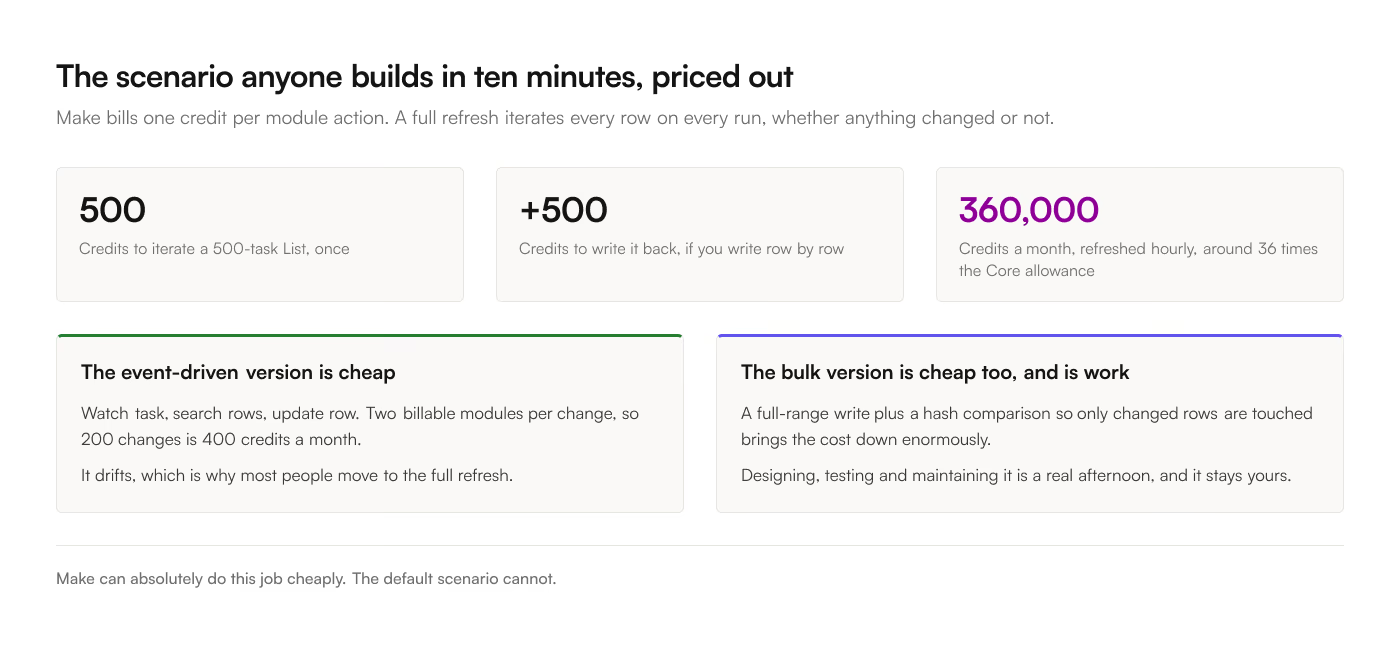
The event-driven scenario. ClickUp watch-task trigger, a Google Sheets search-rows module to find the existing row, an update-row module. 2 billable modules per change, so 400 credits a month. Against 10,000, comfortable.
The full-refresh scenario. This is what most people build, because the event version drifts. A scheduled scenario lists all tasks, iterates them, and updates the sheet. Now the cost is per row per run, every run, whether anything changed or not.
500 tasks, refreshed hourly, 24 hours a day:
- Iterating 500 tasks: 500 credits per run
- Writing them: another 500 if you write per row, or roughly 1 if you use a bulk range update
- 24 runs a day, 30 days: 360,000 credits per month on the per-row version
That is 36 times the Core allowance. Even refreshed once a day it is 15,000 credits, still over. The bulk-update pattern brings it down enormously, and building it correctly, with a full-range write and a hash comparison so you only touch changed rows, is a real afternoon of scenario design.
This is the honest shape of it. Make can do this job, cheaply, if you design the scenario to avoid per-row modules. The default scenario anyone builds in 10 minutes cannot.
Cases for Make
Transformations in flight. Make's data mapping is very good. Splitting a Labels field into separate columns, computing a derived value, reformatting a date, joining 2 ClickUp Lists into one sheet by a shared key. All of that is native, visual, and requires no code. A field-selection sync gives you the raw custom field values and leaves the maths to the spreadsheet.
More than 2 systems. ClickUp to Sheets to Slack to an invoicing tool, with routing and conditions between them, is what a scenario is for. Routers are free, so the branching itself costs nothing.
Non-Sheets destinations. Airtable, Notion, a database, a webhook, and 3,000-plus other apps. A Google Sheets add-on writes to Google Sheets.
You want to see the pipeline. The visual scenario builder makes the data flow legible in a way a sidebar of checkboxes does not. For a complicated multi-branch process, that clarity is worth money.
Cases for a table sync
The requirement is a mirror. "This tab shows what this List shows" is a state problem, and a scenario that solves it well is one you have to design, test and maintain. A sync does it as its only job.
Deletes and reconciliation. A scenario that appends and updates leaves deleted tasks in the sheet forever. Handling deletes means fetching the full id set from ClickUp, diffing against the sheet, and removing the difference, which is more modules and more credits on every run. ClickUp makes this specifically hard: deleting a parent task removes its subtasks server-side with no event per child, so an event-driven scenario never learns those rows should go.
Predictable cost. $9, $19 or $39 a month for the account, whatever the volume, against a credit balance you have to model and an auto-purchase toggle that tops it up. If a busy sprint can double your ClickUp change volume, one of these 2 pricing models does not care.
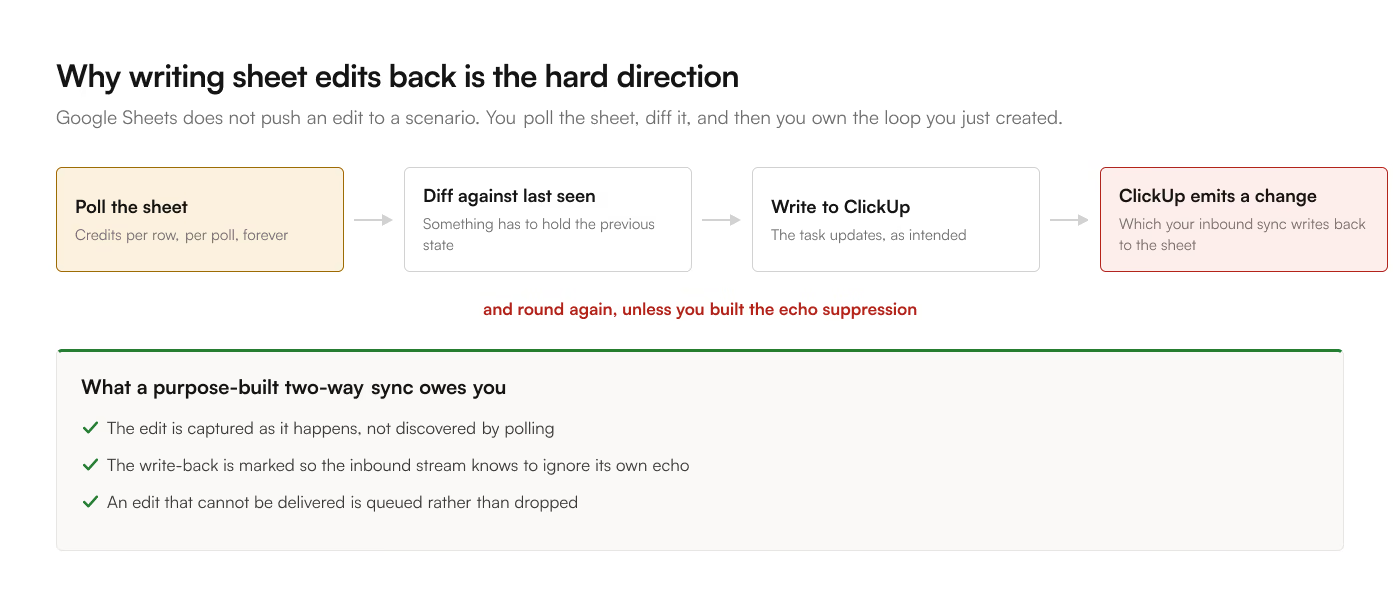
Two-way editing. Writing sheet edits back to ClickUp through Make means detecting the edit, which Sheets does not push, so you poll the sheet on a timer and diff it. That is credits per row per poll, plus an echo-suppression problem you solve yourself or the sync fights itself in a loop.
The summary
|
Make |
ClickUp to Sheets |
| Unit sold |
Credit, one module action |
Account |
| Entry price |
Free, 1,000 credits |
$9/mo, $90/yr |
| Core paid tier |
$9/mo, $7.65 annual, 10,000 credits |
$19/mo, $190/yr, unlimited Lists |
| Free modules |
Routers, error handlers |
Not applicable |
| 500 rows, hourly refresh |
~360,000 credits/mo per-row, ~1 bulk |
Not metered |
| Cost of a full refresh |
Per row, per run |
Flat |
| Minimum interval |
15 min free and 1 min paid |
3-hourly, or live |
| Setup, first List |
45 to 90 min, an afternoon done properly |
5 to 10 min, field checkboxes |
| Removes deleted tasks |
Only if you build the diff |
Yes, reconciled against ClickUp |
| Two-way to ClickUp |
Buildable, with an echo problem |
Yes, on Business |
| Other destinations |
3,000+ apps |
Google Sheets only |
| Transformations |
Excellent |
Field selection only |
| Failure mode |
Credit balance drains, or auto-tops up |
One destination, nothing to route elsewhere |
Make is the right answer when the pipeline is the interesting part. A table sync is the right answer when the pipeline should be invisible and the spreadsheet is the interesting part.
If you are still deciding between the whole category, the 4 ways to sync ClickUp to Google Sheets covers the free routes too, including writing it yourself in Apps Script, which is the honest competitor to a well-built Make scenario. The add-on has a 7-day free trial if you would rather measure the difference than model it.