Unito Pricing for ClickUp to Google Sheets, Worked Out

Unito's Basic plan runs $65 to $139 a month and Pro $299 to $769. What one ClickUp List of 1,000 tasks costs on each plan, against a flat $9 to $39 add-on.

Key takeaways

  • Unito's pricing page shows no numbers, but its own blog (28 Aug 2026) prints Basic at $65 to $139 a month and Pro at $299 to $769.
  • Unito counts every item twice when it sits in 2 tools, so 1,000 ClickUp tasks in a Google Sheet are 2,000 items in sync, the top of Basic.
  • Unito's Google Sheets connector doesn't sync subtasks, and its ClickUp connector doesn't sync time tracking.
  • Basic maps 6 fields per flow, so a ClickUp report with 8 or more columns lands on Pro, which starts at $299 a month.
  • ClickUp to Sheets is $19 a month for any number of Lists on a 3-hour schedule with subtasks and time entries, and $39 for two-way and live sync.
Title card reading Unito pricing for ClickUp to Google Sheets, worked out, on a dark background

Unito's pricing page has no prices on it. It tells you to start a free trial and read them in the app. Unito's own blog prints them anyway. Its post on Unito vs Make went up on 28 Aug 2026 and lists each self-serve tier in dollars. Here are those numbers, checked on 13 Nov 2026, run against one ClickUp List going into one Google Sheet.

Unito's plans and prices

Plan Price a month Items in sync Flows Mapped fields Updates
Basic $65 to $139 750 to 2,000 Up to 10 6 per flow Every 15 min
Pro $299 to $769 2,500 to 10,000 Unlimited Unlimited custom fields Every 5 min
Enterprise Quote only Custom Custom Custom Not stated

Sources: the Unito vs Make post for the dollars, limits and update times, and unito.io/pricing for the plan names and the counting rules. Premium connectors such as Salesforce and ServiceNow sit on Enterprise only. Google Sheets and ClickUp aren't on that list. Prices are in US dollars, and Unito adds tax only for customers in Canada.

That table holds 2 surprises for ClickUp teams. The price climbs with items, not with Lists or users. And the gap between Basic's top ($139 for 2,000) and Pro's floor ($299 for 2,500) is $160 a month for 500 more items.

Unito's item count for a ClickUp task

Unito sells "items in sync." Its pricing page defines them and then doubles them: an item synced between 2 tools counts as 2 items in sync. Subtasks and checklist items count too. Unito's own example is 10 Asana tasks with 50 subtasks, so 60 items, synced to Jira for 120 items in sync.

So a ClickUp task that lands as a row in Google Sheets is 2 items: one in ClickUp, one in the sheet.

Here's the catch for a spreadsheet. Unito's Google Sheets limitations page says "Unito's Google Sheets integration does not sync subtasks," and that sub-items such as checklists won't reach a sheet either. The subtask rule in the pricing still matters if you also sync ClickUp to Jira or Asana. Into a sheet, only parent tasks travel.

Worked case: 1,000 ClickUp tasks

Take one ClickUp List with 1,000 tasks, and give it 1.5 subtasks per task on average. That ratio is an assumption, so swap in your own. That's 1,500 subtasks and 2,500 ClickUp tasks in all. The sheet refreshes every 3 hours.
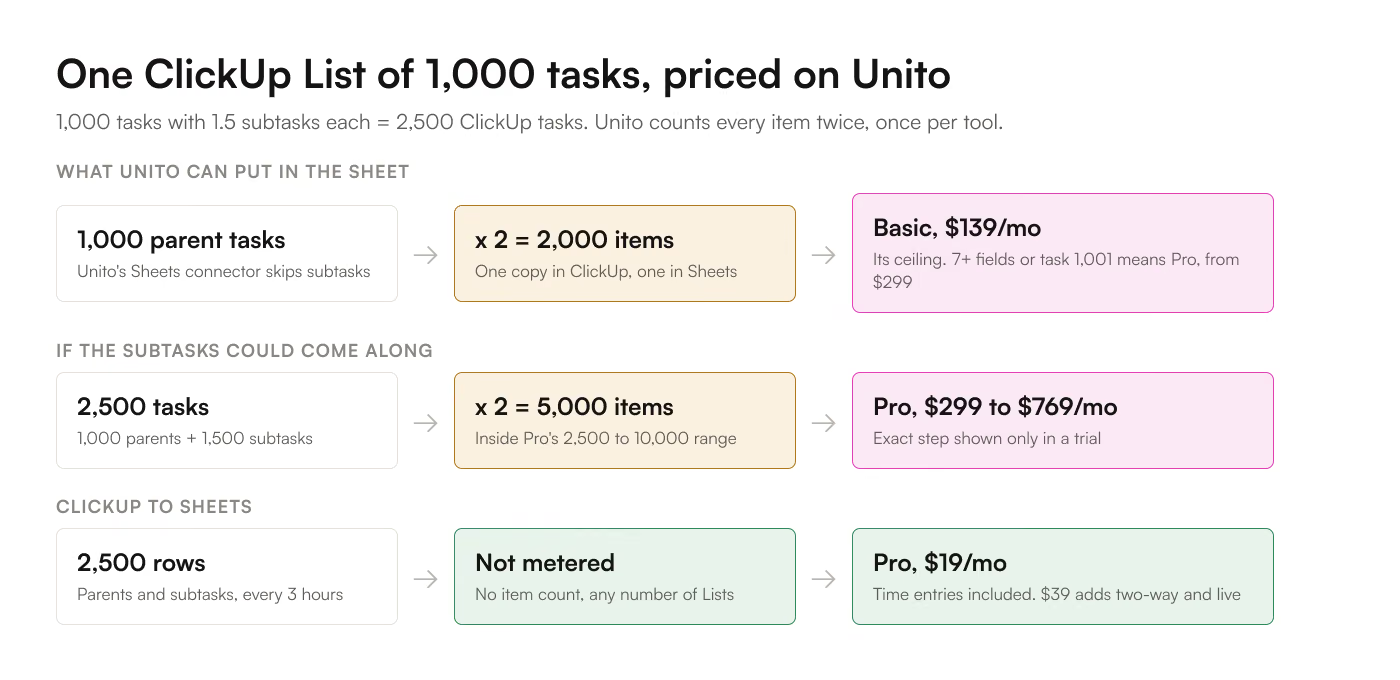
Worked cost of one ClickUp List of 1,000 tasks and 1,500 subtasks synced to Google Sheets: 1,000 parent rows times 2 is 2,000 items in sync, the top of Unito Basic at $139 a month, while 2,500 tasks times 2 would be 5,000 items on Pro; ClickUp to Sheets Pro syncs all 2,500 rows for $19 a month

What Unito can carry into the sheet. 1,000 parent tasks become 1,000 rows. 1,000 x 2 = 2,000 items in sync. That's exactly Basic's ceiling, $139 a month. The 1,001st task goes over, and Unito says it then upgrades you at the next billing cycle to the closest plan for your count. Above 2,000, the closest plan is Pro at $299.

The field limit decides it first. Basic maps 6 fields per flow. A ClickUp status report rarely stops at 6 columns: task name, status, assignee, due date, priority and time estimate already make 6, and a single custom field like Client or Sprint makes 7. At 7 fields you're on Pro, at $299 a month for up to 2,500 items, which covers the 2,000.

What the subtasks would cost if they could come along. 2,500 ClickUp tasks x 2 = 5,000 items in sync. That sits inside Pro's $299 to $769 range. Unito doesn't publish the step for 5,000, so the only way to get the exact figure is the in-app trial. Either way, Unito's Sheets connector won't put those 1,500 subtasks in the sheet.

The 3-hour schedule doesn't change Unito's bill. Unito charges per item, not per run, and Basic already updates every 15 minutes. You pay for minute-level freshness whether the sheet needs it or not.

The same List on the add-on. ClickUp to Sheets Pro pulls all 2,500 rows, parents and subtasks, on a 3-hour schedule for $19 a month. There's no row meter, so a second List or a 10,000-task List costs the same.

One List, 1,000 tasks + 1,500 subtasks Unito ClickUp to Sheets
Rows that reach the sheet 1,000 (subtasks not synced to Sheets) 2,500 (subtasks as rows)
Count billed 2,000 items in sync Not metered
6 fields or fewer Basic, $139 a month Pro, $19 a month
7 fields or more Pro, from $299 a month Pro, $19 a month
A year at that price $1,668 on Basic, $3,588 on Pro $228 monthly, or $190 yearly

Unito's yearly prices aren't published, so the Unito row is 12 monthly payments.

Feature grid for ClickUp and Google Sheets

Checked against Unito's ClickUp field guide, its ClickUp limitations page and its Google Sheets limitations page on 13 Nov 2026.

Unito Basic Unito Pro ClickUp to Sheets
Price a month $65 to $139 $299 to $769 $9 Starter, $19 Pro, $39 Business
Two-way sync Yes Yes Business
Fields per flow 6 Unlimited custom fields Any field you tick
ClickUp custom fields Yes, within the 6 Yes Yes
Subtasks into the sheet No No Yes, as their own rows
ClickUp time entries No, time tracking isn't synced No, time tracking isn't synced Pro and Business
Refresh Every 15 min Every 5 min Manual on Starter, every 3 hours on Pro, live on Business
Lists Within 10 flows Unlimited flows 3 on Starter, unlimited on Pro and Business

Unito's docs name 2 more limits. Its ClickUp connector syncs Lists, never a whole Space or Folder. And its Sheets connector only picks up rows added by hand, so a row a form or a script appends never reaches ClickUp.

Where Unito pulls ahead: comments and attachments move between project tools, and its rules engine decides which side wins an edit. If your second tool is Jira or Asana and not a spreadsheet, see the full comparison, ClickUp to Sheets vs Unito.

Free trials on both sides

Unito's trial runs 14 days, caps you at 500 items in sync, and skips closed tasks. 500 items is 250 ClickUp rows in a sheet, so you can't test the 1,000-task List at full size. The trial also gives you live updates and unlimited fields, which the Basic plan you'd then buy doesn't.

ClickUp to Sheets has a 7-day trial with no credit card. So you can sync the 2,500-row List from the worked case before you pay. The prices are on the pricing page, with no trial needed to see them.

Which one to pick for ClickUp

Pick Unito when ClickUp has to stay in step with another project tool, and the sheet is one flow among several. Its items-in-sync bill buys conflict rules, comments and 60+ connectors.

Pick the add-on when the destination is Google Sheets. You get subtasks as rows and time entries, and the bill stays the same at 400 tasks or 40,000. All the ways to get there, from CSV to API, are in how to sync ClickUp to Google Sheets. The same per-unit sums for the automation tools are in the Zapier comparison and the Make comparison.

Frequently asked questions

How much does Unito cost a month?

Unito's own blog lists Basic at $65 to $139 a month and Pro at $299 to $769, as of 28 Aug 2026. Enterprise gets a custom quote, and the pricing page itself shows no figures.

Does Unito have a free plan?

No. It has a 14-day free trial capped at 500 items in sync, which skips closed tasks.

Do ClickUp subtasks count as items in sync?

Yes, Unito counts subtasks and checklist items, twice when they sit in 2 tools. Its Google Sheets connector doesn't sync subtasks, though, so into a sheet only parent tasks count.

What happens if I go over my Unito items limit?

Your flows keep running and Unito notifies you. If you stay over, it moves you to the closest plan at the next billing cycle.

Can Unito sync ClickUp time tracking to Google Sheets?

No. Unito's ClickUp limitations page says time tracking isn't supported. ClickUp to Sheets syncs time entries on its Pro plan.