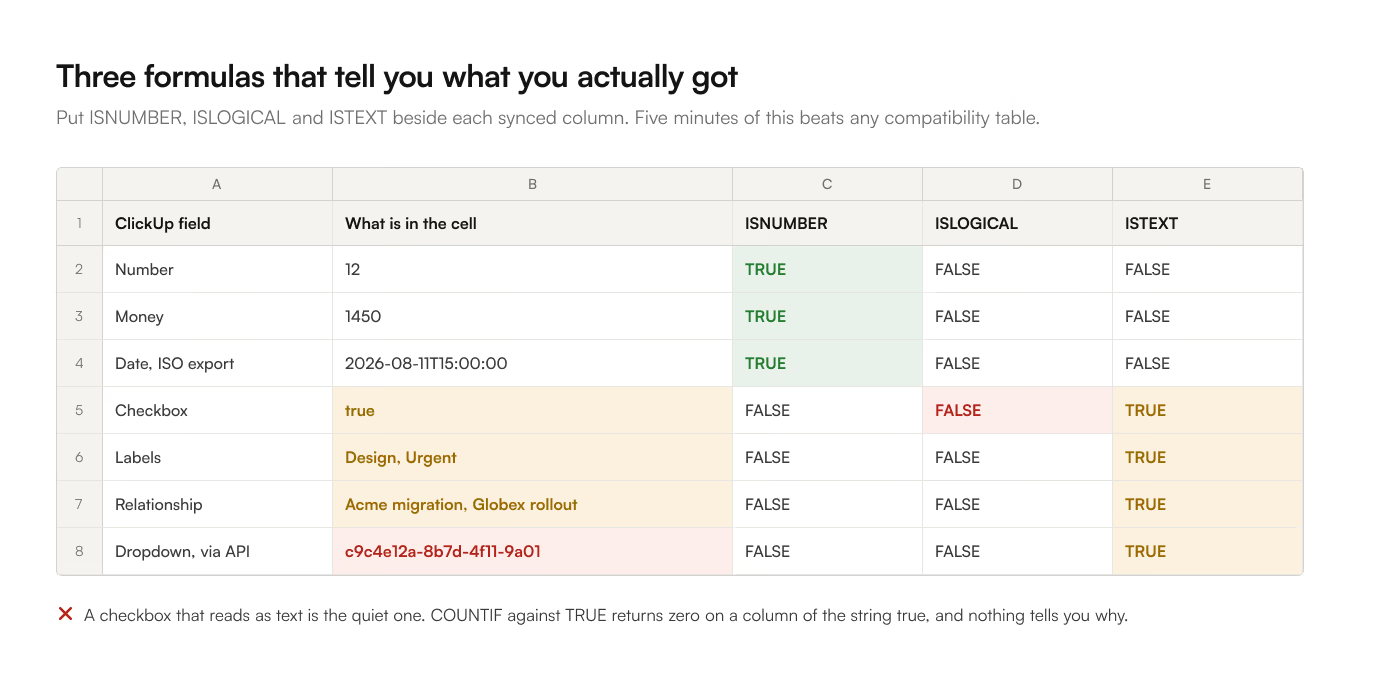
A sync that "works" can still leave you with a column you cannot filter, a date that sorts alphabetically, and a dropdown that reads as a UUID. Each method of getting ClickUp into Google Sheets makes a decision about each field type, and the decisions differ.
This is what each type becomes, why, and what to do about the ones that arrive unusable.
The short version
| ClickUp field | Arrives as | Safe to build on? |
|---|---|---|
| Text, Short text | Plain string | Yes |
| Number | Number | Yes |
| Money | Number, currency symbol dropped | Yes, if you know the currency |
| Date | Depends entirely on export format | Only with ISO |
| Dropdown | Option id via API, label via export | Only after resolving |
| Labels (multi-select) | Comma-joined string | No, needs splitting |
| Checkbox | true / false string |
Yes, with care |
| People / Assignee | Comma-joined display names | No, names are not unique |
| Relationship | Comma-joined task names | Relationship is lost |
| Formula | Computed value at read time | Yes, as a snapshot |
| Rollup | Computed value at read time | Yes, as a snapshot |
| Progress (auto) | Percentage number | Yes |
| Files / Attachment | URL, or nothing | Rarely |
| Email, Phone, Website | Plain string | Yes |
| Rating | Number | Yes |
| Location | Formatted address string | No, coordinates dropped |
Here are the ones that cause real trouble.
Dates are the field that decides everything
A date is the field most reports depend on and the field most likely to arrive as text.
Through ClickUp's CSV export, you pick the format yourself, and the default is the wrong one. The 3 options are Normal (Mon, Aug 11, 2026 3:00 pm +02:00), ISO (2026-08-11T15:00:00), and POSIX (1786554000000, milliseconds since 1 January 1970).
Google Sheets parses ISO into a real date value on import. It parses Normal as a text string, and text sorts alphabetically, so April comes before January and your Gantt-style chart is nonsense. POSIX arrives as a 13-digit integer, which is at least honest about being a number; convert it with:
=A2/86400000 + DATE(1970,1,1)
Through the ClickUp API, dates always come back as POSIX milliseconds as a string, with no option. Any Apps Script implementation has to divide and offset, and has to decide what timezone to render in, because the API gives you an instant with no local context.
A subtlety worth knowing: ClickUp stores a due date with a flag for whether the time component is meaningful. A task due "on Tuesday" and a task due "Tuesday at 5pm" are both a millisecond timestamp; only the due_date_time boolean tells them apart. Sync tools that ignore that flag show every all-day task as due at midnight or at 4am, depending on the timezone they picked.
If your dates already arrived wrong, why ClickUp dates land as text in Google Sheets works through the repair.
Dropdowns arrive as ids over the API
This is the single biggest gap between a CSV export and a homegrown API integration.
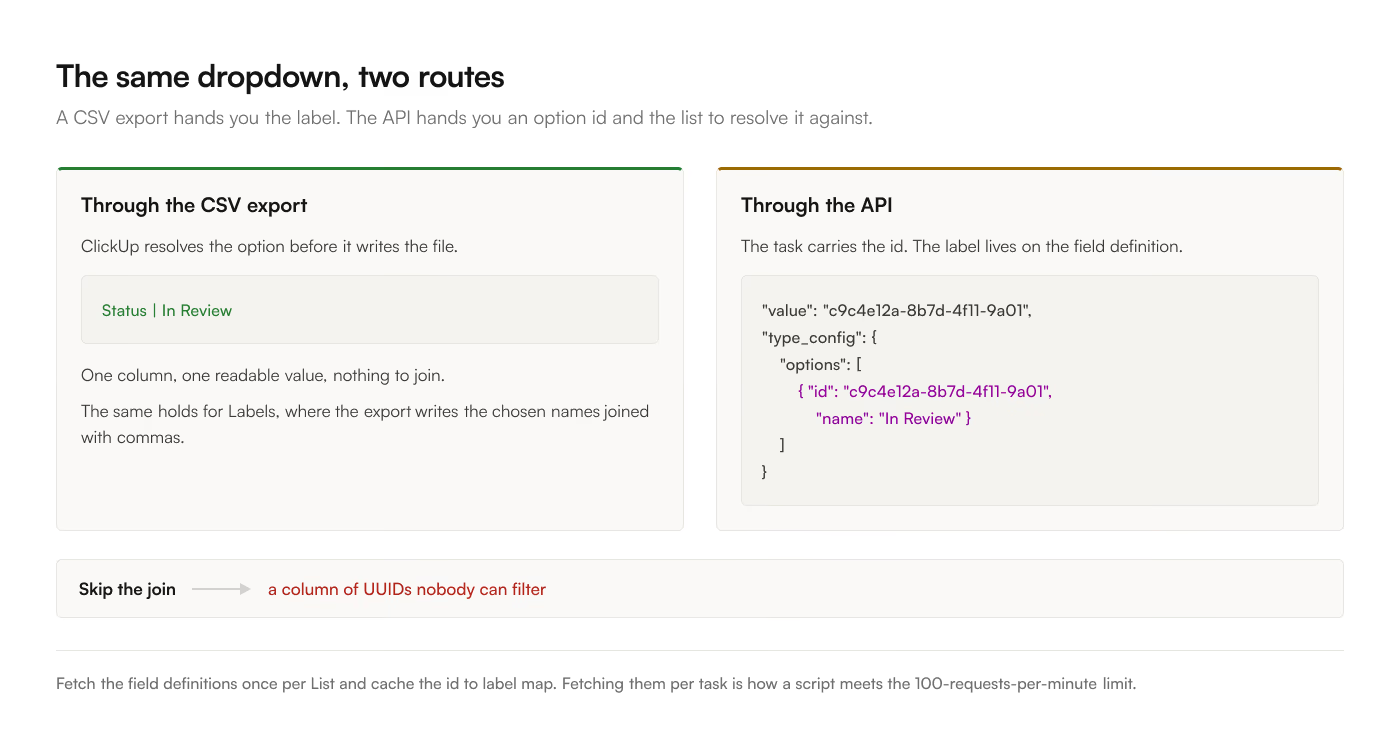
The export resolves dropdown values to their labels. You get In Review, and that is the end of it.
The API returns the selected option's id, something like c9c4e12a-8b7d-4f11-9a01-2f8e4b6c1d33, plus a separate type_config object on the field definition that lists every option with its id, name, color, and order. Resolving one to the other is a join you have to write. Skip it and your spreadsheet has a column of UUIDs.
The same applies to Labels, ClickUp's multi-select type, except each task carries an array of option ids and the resolved result needs joining into one cell or spreading across several.
If you are building on Apps Script, fetch the field definitions once per List and cache the id-to-label map. Fetching it per task is how you burn through the 100-requests-per-minute rate limit.
Relationships lose the relationship
A Relationship field points at other ClickUp tasks. In a spreadsheet it becomes their names, joined with commas, in one cell.
Acme migration, Globex rollout is a string. There is no id, no link, and no way to know whether "Acme migration" is one task or 3 tasks that happen to share a name. If your report needs to follow the relationship, you need the linked task ids, which means the API rather than the export, and a second column carrying task.id values you can VLOOKUP against.
The same is true of People fields. 2 people named Alex Chen produce identical cells. Match on the user id, never on the display name.
Formulas and rollups are snapshots
A ClickUp Formula field is computed inside ClickUp. Whatever crosses into Sheets is the value it held at read time, frozen.
That is usually what you want, and occasionally a trap. If the formula depends on today() or on a rollup over child tasks, the number in your Sheet ages while the number in ClickUp does not, and the 2 disagree until the next sync. If the number matters, recompute it in Sheets from the underlying columns rather than importing the ClickUp result.