Coupler.io is a data-integration platform: 400-plus sources into Google Sheets, Excel, BigQuery, Looker Studio, and a few warehouses. ClickUp is one source among many, and its connector pulls tasks, users, time entries, custom fields and comments.
If your reporting stack pulls from 6 systems, that breadth is the product and this comparison ends quickly in Coupler's favour. If ClickUp into Google Sheets is the whole job, the pricing model deserves a closer look, because two of its dimensions are the ones a task sync uses hardest.
Published pricing
From coupler.io/pricing, monthly-billed with the annual per-month figure alongside:
| Coupler.io plan |
Monthly |
Annual, per month |
Sources |
Users |
Refresh |
Rows per run |
| Free |
$0 |
$0 |
1 |
1 |
Manual |
100 |
| Starter |
$32 |
$24 |
400+ |
1 |
Daily |
5,000 |
| Active |
$132 |
$99 |
400+ |
Unlimited |
Daily |
Unlimited |
| Pro |
$259 |
$199 |
400+ |
Unlimited |
Hourly |
Unlimited |
| Agency / Enterprise |
Custom |
Custom |
Custom |
Unlimited |
15 min |
Unlimited |
Against ClickUp to Sheets: $9 a month or $90 a year for Starter, up to 3 Lists or views on manual sync. $19 or $190 for Pro, unlimited Lists with 3-hourly scheduling, time entries and user sync. $39 or $390 for Business, which adds live sync, two-way sync and reports. No row cap on any plan, and no per-user pricing.
The 2 dimensions that bite
Coupler prices on rows and refresh. Both hit a task sync first.
Rows per run
The Free plan's 100 rows per run makes it a demo. Starter's 5,000 is a real number, and it is per run rather than per month, so it is a ceiling on List size rather than on usage.
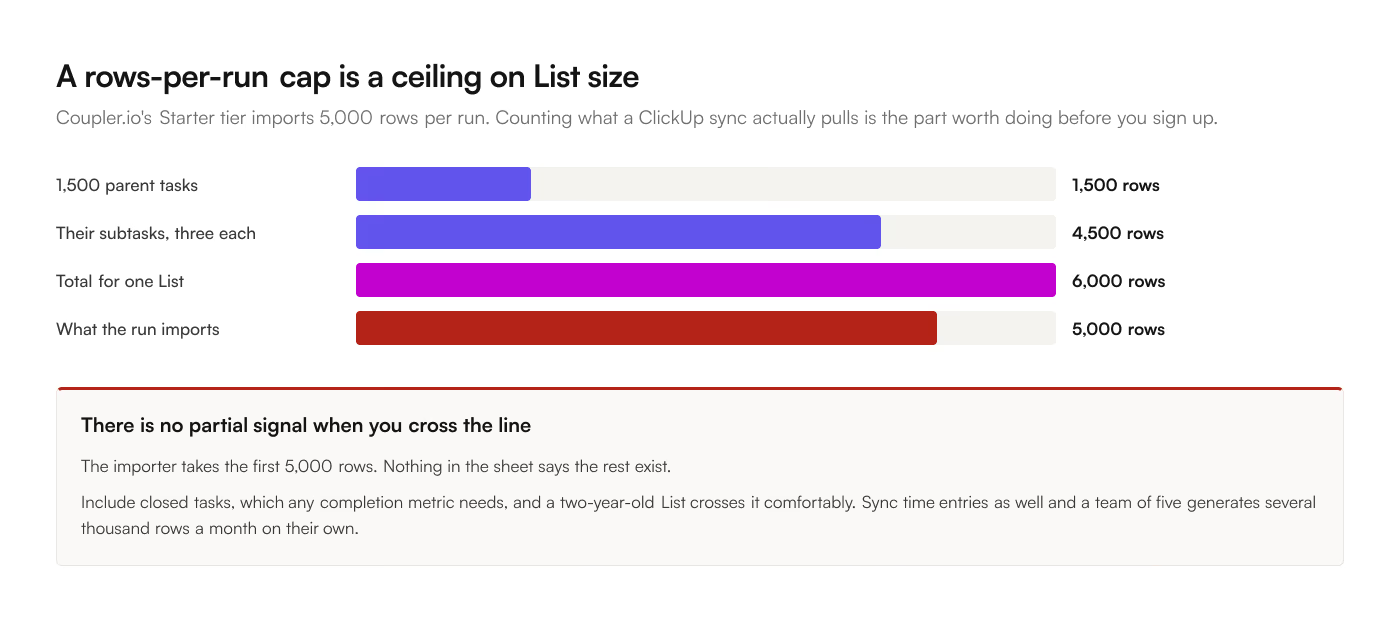
5,000 tasks sounds generous until you count what a ClickUp sync actually pulls. Turn on subtasks and a 1,500-task List with an average of 3 subtasks each is 6,000 rows. Include closed tasks, which you need for any completion metric, and a 2-year-old List crosses it comfortably. Sync time entries as well and a team of 5 logging a handful of entries a day adds a few 100 rows a month on its own.
There is no partial signal when you cross the line. The importer takes the first 5,000 rows and the report undercounts.
Removing the cap means Active at $132 a month, or $99 a month billed annually.
Refresh frequency
Daily on Starter and Active. Hourly on Pro at $259 a month, or $199 billed annually. 15 minutes only on the custom Agency and Enterprise tiers.
Daily is fine for a monthly report and awkward for anything a team looks at during the day. A task closed at 10am shows as open until tomorrow. For a status board or a shared client view that is the difference between "the report" and "the report, which is a day behind, let me check ClickUp."
3-hourly scheduling sits in the ClickUp to Sheets Pro plan at $19 a month, and live sync in the Business plan at $39.
Where Coupler.io is the right answer
More than one source. ClickUp plus HubSpot plus Stripe plus Google Analytics into one reporting sheet is exactly what Coupler is for, and no single-purpose tool competes.
Destinations beyond Sheets. BigQuery, Looker Studio, Excel, PostgreSQL. A Google Sheets add-on writes to Google Sheets.
Transformations before landing. Column selection, filtering, aggregation, and joins across imports happen in Coupler's pipeline, so the sheet receives finished data.
Blending sources. Merging ClickUp tasks with time from another system into one table is a native operation.
Speed to a first import. The importer wizard is quick, roughly 10 to 20 minutes from a ClickUp API token to a populated sheet. Coupler is very good at this part.
Somebody else owns the pipeline. For an agency running reporting for a dozen clients from a dozen systems, a platform is the correct shape.
Where a single-purpose add-on is the right answer
Writing back to ClickUp. Coupler.io imports, in one direction. If you want to edit a status in the sheet and have ClickUp reflect it, that sits outside the model entirely, and it is the Business plan's whole reason to exist.
Sub-daily freshness without the Pro tier. Hourly starts at $259 a month billed monthly. 3-hourly is $19, and live is $39.
Row counts you do not have to model. No cap means no arithmetic and no ceiling to discover at 5,001.
Per-user pricing you do not have to model either. Coupler's Starter tier is one user, and a second person on the reporting rota is the $132 Active plan. The add-on prices the account.
Data path. The add-on runs inside Google Sheets and talks to ClickUp's API directly, so task data does not pass through a third party's servers. For workspaces where task titles carry client names or commercial terms, that is a procurement conversation avoided.
Deletes. Confirm this on whatever you pick. A sheet that only grows is a report that overcounts, and ClickUp's cascade delete of subtasks emits no per-child event, so the reconciliation has to run against the full source listing.
The summary
|
Coupler.io |
ClickUp to Sheets |
| Unit sold |
Plan, capped by rows and users |
Account |
| Sources |
400+ |
ClickUp |
| Destinations |
Sheets, Excel, BigQuery, Looker |
Google Sheets |
| Entry paid price |
$32/mo, $24 annual |
$9/mo, $90/yr |
| Users on the entry tier |
1 |
Account-wide |
| Unlimited rows from |
$132/mo, $99 annual |
$9/mo |
| Sub-daily refresh from |
$259/mo, $199 annual |
$19/mo |
| Live sync |
No |
$39/mo |
| Setup, first import |
10 to 20 min |
5 to 10 min |
| Writes back to source |
No |
Yes, on Business |
| Transformations |
Yes, in-pipeline |
Field selection |
| Data path |
Coupler's servers |
Direct to ClickUp's API |
| Failure mode |
Silent truncation at the row cap |
One destination, nothing to route elsewhere |
Pick Coupler.io when reporting is a pipeline problem across several systems. Pick a single-purpose add-on when the job is 1 List and 1 tab, current, and possibly editable from the spreadsheet side.
For the event-driven alternatives, ClickUp to Sheets compared with Zapier and with Make run the same arithmetic against per-task and per-credit pricing. The add-on carries a 7-day free trial, which is long enough to find out whether your List clears 5,000 rows.