Unito is the serious answer to two-way sync between project tools. Jira and Asana, ClickUp and Trello, GitHub and Jira, and yes, ClickUp and Google Sheets. Bidirectional field mapping, conflict handling, and rules about which side wins are the product, across 60-plus connectors.
It is priced for that ambition, and the unit it counts is the one a spreadsheet mirror consumes fastest.
Unito pricing
Unito does not publish price tiers. What it publishes is a formula:
Tools + Items in sync + Features = Your price
Tools means the connectors you need. Items in sync means the volume of data objects kept aligned. Features means the capability package that fits your use case. Actual figures appear in-app once you start a free trial, or come out of a sales conversation.
The tier names are worth knowing before you ask. Basic and Pro are the self-serve plans. Standard, Premium and On-prem are the enterprise plans, quoted after a demo.
The item in sync is the unit, and Unito's definition is worth reading closely. Items in sync are "the individual work items Unito keeps aligned across tools, like tasks, subtasks, spreadsheet rows, checklist items, issues, or tickets."
And the counting: "Each item synced between 2 tools counts as 2 items in sync. That includes tasks, subtasks, and checklist items." Unito's own example is 10 tasks plus 50 subtasks in Asana, which is 60 items, synced to Jira for 120 items in sync.
Read that twice. Subtasks count individually, and the total doubles because each item exists on both sides.
Sync frequency: Basic and Pro update every 5 to 15 minutes. Enterprise adds live and historical syncing.
What that means for a ClickUp List
Take a modest ClickUp List: 400 parent tasks with an average of 3 subtasks each.
- 400 parents plus 1,200 subtasks = 1,600 ClickUp items
- Mirrored into Google Sheets: 1,600 x 2 = 3,200 items in sync
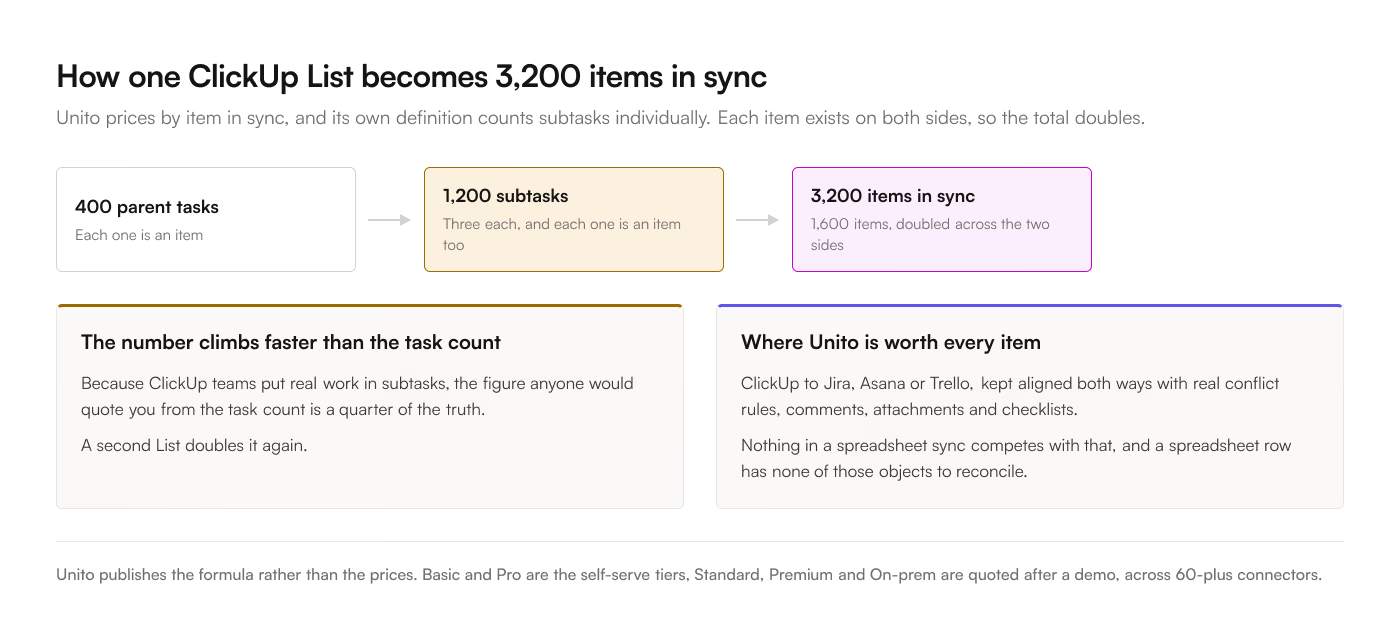
From one List. A second List doubles it again. Because subtasks count, and ClickUp teams lean hard on subtasks, the number climbs faster than the task count anyone would quote you.
A flat-price add-on charges the same $9 to $39 a month whether the List holds 40 rows or 40,000. Starter is $9 a month or $90 a year for up to 3 Lists on manual sync, Pro is $19 or $190 for unlimited Lists with 3-hourly scheduling and time entries, Business is $39 or $390 and adds two-way and live sync.
Cases for Unito
2 project tools. ClickUp to Jira, ClickUp to Asana, ClickUp to Trello, kept aligned both ways with real conflict rules. This is Unito's core competence and nothing here competes with it.
Field mapping with rules. Map ClickUp's In Review to Jira's Code Review, decide which side wins a simultaneous edit, and set direction per field so status flows one way and comments the other. That is much more than a spreadsheet sync needs and exactly what a tool-to-tool sync does need.
Comments, attachments, and checklists. Unito syncs richer objects than rows. If the requirement includes discussion moving between systems, a spreadsheet was never the answer.
Many-to-many. Several ClickUp Lists into several destinations with rules per flow, governed centrally.
Enterprise procurement. SOC 2, a security review, an MSA, and someone to call. A $9 add-on does not come with that.
Cases for the add-on
The destination is a spreadsheet. A Google Sheet row has no comments, checklists or attachments to reconcile. Most of what you would pay Unito for has nothing to act on.
The list is large. The items-in-sync model is precisely wrong for a big mirror, and the doubling makes it worse. Flat pricing does not care.
Subtask-heavy workspaces. Each subtask is a billable item on one model and a free row on the other.
You want a price before you build. Unito's figures live behind a trial or a demo, which is normal for a sales-led product and awkward if you are comparing 4 options on a Tuesday afternoon. The add-on's 3 prices are on the pricing page.
You want the data path short. The add-on runs inside Google Sheets and calls ClickUp's API directly. Unito is a hosted service in the middle, which is a fine architecture and a longer conversation with anyone reviewing where client data goes.
Sub-5-minute freshness on a normal budget. Unito's Basic and Pro tiers update every 5 to 15 minutes, with live reserved for enterprise. Live sync sits in the $39-a-month Business plan on the add-on.
The summary
|
Unito |
ClickUp to Sheets |
| Unit sold |
Item in sync, doubled per direction |
Account |
| Subtasks counted |
Yes, individually, and doubled |
Not metered |
| 400 tasks and 3 subtasks each |
3,200 items in sync |
Not metered |
| Published prices |
No, shown in-app or after a demo |
Yes, $9 / $19 / $39 |
| Plan names |
Basic, Pro, Standard, Premium, On-prem |
Starter, Pro, Business |
| Two-way |
Yes, with conflict rules |
Yes, on Business |
| Sync frequency |
5 to 15 min, live on enterprise |
3-hourly, or live on Business |
| Setup, first flow |
20 to 40 min, plus a trial to see a price |
5 to 10 min, field checkboxes |
| Destinations |
60+ connectors |
Google Sheets |
| Syncs comments and attachments |
Yes |
No |
| Data path |
Unito's servers |
Direct to ClickUp's API |
| Failure mode |
Item count climbs with subtasks, price follows |
One destination, nothing to route elsewhere |
The honest read: these tools barely compete. Unito is for keeping 2 project tools aligned, and it is very good at it. If your destination is a spreadsheet, you are buying a fraction of the product and paying for it by the row.
Run the same arithmetic against the event-priced tools in the Zapier comparison and the Make comparison, or start from the 4 ways to sync ClickUp to Google Sheets. The add-on's 7-day trial needs no sales call to see a number.